What is VPN? UCVPN Beginner's Guide

A VPN (Virtual Private Network) is a Tools used to enhance online security and privacy. It encrypts your network data transmission and "masks" your real IP (Internet Protocol) address, establishing a more secure and private connection. With a VPN, your online activities are less likely to be tracked, monitored, or collected by third parties.

Additionally, VPN can enhance protection by reducing ad interference, lowering the chances of tracker data collection, and helping block some malicious websites or risky content, allowing you to browse more securely across phones, computers, and other devices.

Get UC VPN
30-day money-back guarantee

Why Do You Need a VPN?

Online Security Protection

Data is more easily intercepted on public Wi-Fi and corporate networks. VPN reduces the risk of account theft and payment information leaks through encrypted transmission.

Bypass Forced Restrictions

Some network environments restrict access or force redirects. VPN helps you get more stable connection paths, reducing blocks and abnormal verification.

Anti-Tracking Privacy Protection

Many websites and apps record your IP, location, and behavior for profiling and targeted ads. VPN hides your real IP, reducing tracking and targeted advertising.

Stable Gaming Latency

Cross-region gaming often encounters routing detours, jitter, and packet loss. VPN optimizes routing through line selection, reducing network fluctuations.

Avoid Price Discrimination

Some platforms show different prices based on region. VPN lets you switch network exits to compare prices across regions.

Secure Online Content Viewing

When streaming or watching live content, unstable links cause buffering. VPN provides encryption and more stable connections for smoother viewing.

Disclaimer: Using UCVPN services for any illegal activities is strictly prohibited and violates our Terms of Service. Please ensure all activities comply with applicable laws and regulations.

UCVPN Is Worthy of Your Trust

Enjoy superior online privacy and security protection

Get UC VPN
30-day money-back guarantee

How does a VPN work?

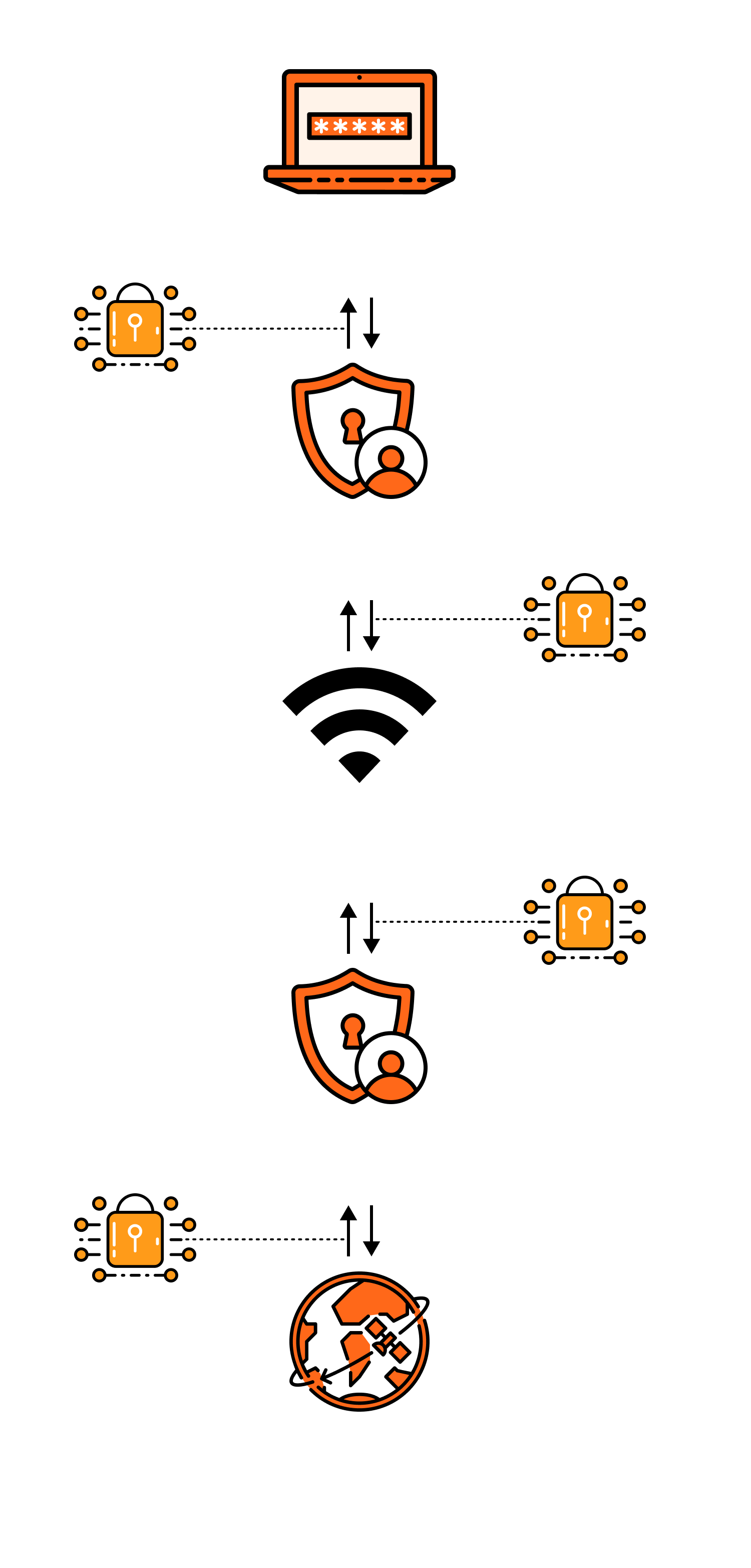
Once a VPN is activated, it connects to a VPN server, encrypts and reroutes your network connection, and then encrypts the data through a "private tunnel" before the server accesses the internet on your behalf. The result is that your real IP is less likely to be exposed, network transmission is more secure, and in some network environments, it may be more stable and smooth.

  1. Establish a secure connection

When you activate a VPN, the client first "handshakes" with a VPN node server, completes identity verification, and negotiates encryption methods and session keys. This process is akin to setting up a reliable channel first, ensuring that subsequent data transmission has unified security rules.

  1. Encrypt and encapsulate data

Once connected, all network requests from your device (such as opening a webpage, logging into an account, watching videos) are encrypted by the VPN client and "encapsulated," transmitted through the network like a secure package. At this point, even if someone intercepts the data in public Wi-Fi, shared networks, or complex routes, it is difficult to read the actual content, thereby reducing the risk of being monitored or hijacked.

  1. Server proxy access and exit replacement

After the VPN server receives your encrypted data, it first decrypts it, then accesses the target website/service on your behalf, and encrypts the returned data back to you. To the website, your access source appears as the VPN server's IP, not your device's real IP. Many reliable VPNs also incorporate DNS protection, kill switch mechanisms, etc., to prevent "real IP leakage when disconnected," further enhancing privacy and security.


Understand the Basics of VPN

What is a VPN Encryption Tunnel?

A VPN encryption tunnel (also known as an "encrypted tunnel") refers to a secure transmission link established between your device and the VPN server. Once the VPN is activated, your network data is first encrypted and encapsulated locally before being sent over the internet to the VPN server; even if intercepted, it is difficult to decipher. The server decrypts it to access the target website on your behalf and encrypts the returned data again for transmission back, thereby enhancing privacy and security, and hiding the real IP.

This achieves the purpose of preventing eavesdropping, tampering/hijacking, and hiding the real network IP.

What is a VPN Server?

A VPN server is a relay node deployed by VPN service providers in various locations. Once connected, all your network traffic is first encrypted and sent to this server, which then accesses websites or applications on your behalf and returns the results. The IP displayed externally is that of the server, not your real IP, thereby enhancing privacy and security; it also allows switching between different regional network exits, improving connection stability in certain network environments.

What is an IP Address?

An IP address is the "network address" of a device on the internet, used to identify your connection location, allowing data packets to find you and deliver information. When visiting websites or using apps, servers can usually see your IP to roughly determine your region and service provider. Your IP may change with network changes (such as switching Wi-Fi/data) and can also appear as the server's IP through a VPN.

What is Data Encryption?

Data encryption refers to converting stored or transmitted data (such as account passwords, chat content, files, payment information, etc.) into ciphertext using encryption algorithms and keys, making it unreadable to unauthorized individuals. When decryption is needed, the corresponding key is used to restore it to plaintext. Data encryption is commonly used to protect privacy, prevent leaks, and reduce the risk of eavesdropping or tampering, applicable to both network transmission and local files and databases.

What Information Can a VPN Hide?

Information a VPN Can "Hide" essentially involves encrypting your traffic and sending it to the VPN server, which then accesses the internet on your behalf. Therefore, it primarily conceals information related to network exit points and transmission content.

What Information Can Be Hidden? With VPN Without VPN
Public IP Address ✅ Hidden ❌ Public
Geolocation ✅ Hidden ❌ Public
Accessed Content ✅ Hidden ❌ Public
Network Data ✅ Encrypted ❌ Public
Email Address ❌ Public ❌ Public
Shopping Credit Card Information ❌ Public ❌ Public
Search History After Logging into Google Account ❌ Public ❌ Public
Social Media Posts ❌ Public ❌ Public
Cookies ❌ Public ❌ Public
GPS Location ❌ Public ❌ Public
Targeted Advertising ✅ Very Rare ❌ Very Frequent

Online and Offline Security

Comprehensively protect your online activities, devices, and digital identity, ensuring peace of mind with every online interaction

Get UC VPN
30-day money-back guarantee

Can a VPN Make You Completely Anonymous?

A VPN cannot make you "completely anonymous." It primarily encrypts your internet traffic and hides your real IP, making it harder for websites and third parties to identify you through your network exit, thus enhancing privacy and security. However, if you log into accounts, are recognized by browser/device fingerprints, save cookies, enable location permissions, or use real payment information, you may still be linked to your personal identity. A VPN is more of a "privacy enhancement tool" rather than an absolute anonymity solution.

How Secure is VPN?

The overall security level of VPNs is relatively high, primarily reflected in two aspects: firstly, it encrypts your network data during transmission, reducing the risk of eavesdropping, hijacking, or tampering on public Wi-Fi or shared networks; secondly, it hides your real IP, making it more difficult for third parties to locate you or track your online activities through network exits. However, it is not "absolutely secure." If the service provider is not trustworthy, logs activities, or if there is DNS leakage or no kill switch protection after disconnection, privacy may still be exposed. Additionally, VPNs only protect the network transmission layer: logging into accounts, granting location permissions, browser fingerprints, and cookies can still identify you. Choosing a trustworthy service, enabling leak protection and kill switch, and keeping the client updated will ensure better security.

Get UC VPN

Types of VPN?

There is no clear ISO certification classification standard for VPN types, but commonly, based on usage scenarios and deployment methods, there are three types:

Remote Access VPN

Remote Access VPN primarily addresses secure access to the company's internal network when working from home or traveling. Once connected, you can access internal systems, files, and business backends as if you were in the office, with access scope restricted through authentication and permission control to prevent data leakage. It not only encrypts transmission but also emphasizes access management and auditing to ensure remote work efficiency and compliance security.
Site-to-Site VPN

Used to interconnect multiple sites such as headquarters, branches, data centers, and cloud networks over the long term. A stable encrypted channel is established between the two ends to achieve inter-regional intranet connectivity, allowing systems to collaborate and transmit data according to intranet addresses. The focus is on routing planning and network segment isolation, ensuring smooth business linkage while reducing security risks associated with cross-network interconnection.

Personal VPN

Designed for regular users, it can be used with a single click. By encrypting network traffic and hiding the real IP, it reduces the risk of being monitored or hijacked on public Wi-Fi, making browsing, logging in, and payments more secure. In certain network environments, it can also improve connection stability, reducing lag and jitter. It primarily protects transmission layer privacy, but account logins, location permissions, etc., may still expose identity.

VPN Protocols

VPN Protocols VPN protocols are the set of rules that determine **"how to establish a connection, encrypt data, and transmit data"** between a VPN client and server. Different protocols vary significantly in speed, stability, compatibility, and anti-blocking capabilities. There are various VPN protocols, and simply put, the following are currently the most effective:

WireGuard®

A next-generation VPN protocol, known for fast connection establishment, low latency, and excellent speed performance, with friendly power consumption, making it suitable for long-term use on mobile devices, gaming, and video streaming. It is relatively simple to configure and offers a more "modern" experience. In certain strict network environments, it may need to be paired with other solutions as a backup.

Features : Fast speed, low latency, low power consumption, quick connection establishment.

Suitable for : Daily mobile use, gaming, video streaming, long-term use.

OpenVPN

OpenVPN is an open-source VPN, a classic and versatile protocol with strong compatibility and a wide range of configuration options, suitable for multiple platforms and various network environments, often used in complex networks or enterprise scenarios. It can use UDP for speed or TCP for enhanced penetration. The downside is relatively higher power consumption, and speed and connection feel may not match newer protocols.

Features : Suitable for complex networks, enterprise/cross-platform scenarios, requiring stronger penetration compatibility.

Suitable for : Generally more power-consuming than newer protocols, speed may be slightly slower.

IKEv2/IPsec

Known for its stability, especially suitable for mobile devices switching between Wi-Fi and cellular networks, quickly restoring connections for a smooth experience. It has good system Support and is relatively easy to configure, suitable for daily internet use and office work. In some restricted networks, it may be more easily identified or blocked, thus often serving as a stable backup option.

Features : Quick recovery during mobile network switching (Wi-Fi/4G/5G), good stability.

Suitable for : iOS users, scenarios with frequent network switching/unstable signals, office connections.

L2TP/IPsec

An earlier VPN solution, still supported by many systems, with decent deployment and compatibility, often used for older devices or specific compatibility needs. Security relies on IPsec, but overall performance and flexibility are average, with higher connection overhead. Nowadays, it is usually not the first choice, better suited as a backup in special environments.

Features : Decent system compatibility but relatively older, average performance.

Suitable for : Special older devices/older system compatibility.

SSTP

Promoted by the Microsoft ecosystem, commonly used in Windows environments. It typically transmits in a manner similar to HTTPS, making it easier to bypass certain network restrictions, useful as a penetration backup. The downside is that it is relatively Windows-centric, with less support and configuration flexibility on other platforms compared to general solutions.

Features : Often uses HTTPS-like ports, advantageous for penetrating certain networks.

Suitable for : Windows environments, backup solutions under specific network restrictions.

PPTP

A very old protocol, its advantage is simple setup and fast connection, but it has weak security, no longer meeting modern privacy protection requirements, and is easily cracked or monitored. Unless for compatibility with very old systems or temporary testing, it is generally not recommended; in practical applications, more secure new solutions should be prioritized.

Features : Simple configuration but weak security, no longer meets modern security needs.

Conclusion : Do not use unless there is a special historical compatibility need.